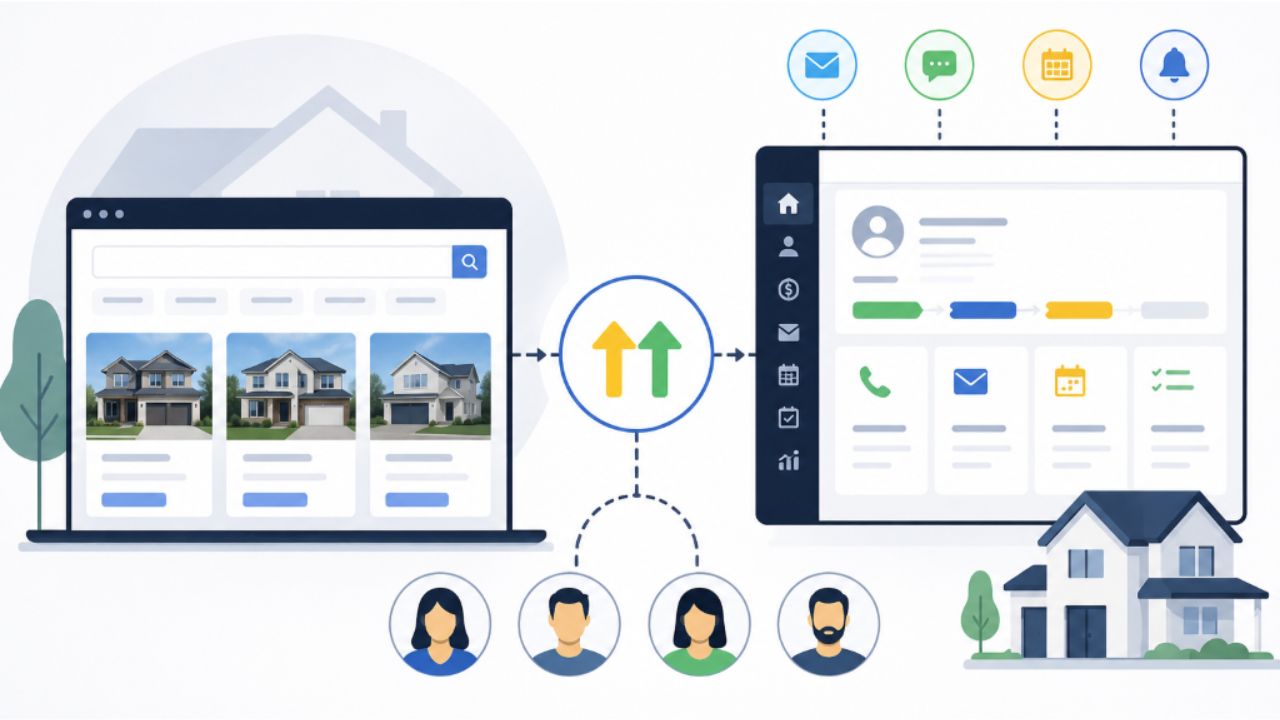
Real estate businesses often use several disconnected platforms.
The website displays property listings. A separate CRM stores contacts. Email campaigns run through another tool. Text messages may be sent manually. Appointments are managed through an independent calendar, and agents track follow-ups in spreadsheets or personal notes.
Each tool may work individually, but disconnected systems can create missed leads, duplicate data, delayed responses, and limited reporting.
Combining an IDX website with GoHighLevel can create a more organized real estate lead generation system.
The IDX website attracts and captures property interest. GoHighLevel manages communication, qualification, appointments, pipelines, and long-term nurturing.
The Role of the IDX Website
An IDX website is the property discovery component of the system.
It allows buyers to search live or recently updated listings based on criteria such as:
- City
- Neighborhood
- Price
- Property type
- Bedrooms and bathrooms
- New listings
- Open houses
- Lot size
- Special property features
The IDX platform or approved data provider remains responsible for delivering property data according to the MLS rules and available data standards.
RESO describes its Web API as a standardized method for transporting real estate data between authorized systems.
The IDX website should also include supporting pages such as:
- City landing pages
- Neighborhood guides
- Buyer resources
- Seller resources
- Home valuation pages
- Agent profiles
- Contact pages
- Property alert registration pages
These pages help attract visitors at different stages of the home-buying or selling process.
The Role of GoHighLevel
GoHighLevel becomes the lead management and communication component.
It can be configured to manage:
- Contacts
- Buyer and seller information
- Lead sources
- Opportunities
- Pipelines
- SMS communication
- Email campaigns
- Appointment calendars
- Internal notifications
- Agent assignments
- Tasks
- Long-term nurture campaigns
HighLevel also offers real-estate-focused configurations for capturing inquiries, following up with leads, and tracking opportunities.
How the Complete System Works
A complete IDX and GoHighLevel system may follow these steps.
Step 1: Attract the Right Website Visitors
The website can attract potential clients through:
- Local SEO
- Google Business Profile activity
- City and neighborhood pages
- Property listing pages
- Real estate blog content
- Social media
- Paid advertising
- Referral traffic
- Email campaigns
The objective is not to attract every possible visitor. It is to attract people interested in the locations and services the brokerage provides.
Step 2: Help Visitors Search Properties
The IDX search should make it easy for visitors to find relevant properties without unnecessary steps.
Useful search options may include:
- Homes under a specific price
- Newly listed properties
- Waterfront homes
- Condominiums
- New construction
- Investment properties
- Land for sale
- Luxury properties
- Homes in specific school areas
Step 3: Capture Lead Information
Lead capture opportunities may include:
- Request property information
- Schedule a showing
- Save a favorite property
- Create a saved search
- Sign up for listing alerts
- Download a buyer guide
- Request a home valuation
- Ask an agent a question
Forms should request enough information to continue the conversation without making the visitor complete an unnecessarily long questionnaire.
Step 4: Send the Lead to GoHighLevel
The IDX website can send lead information through:
- A native integration
- Zapier
- Make
- n8n
- An inbound webhook
- A custom API integration
HighLevel’s inbound webhook workflow trigger allows external applications to send information into a workflow.
The integration should ideally transfer both contact information and property context.
Step 5: Create or Update the Contact
Before creating a new record, the system should search for an existing contact using the email address or phone number.
This helps prevent duplicates when the same buyer:
- Views several properties
- Submits multiple inquiries
- Creates a saved search
- Returns after several weeks
- Uses a different website form
The lead’s newest activity can be added to the existing contact record.
Step 6: Create an Opportunity
The system can create an opportunity in the appropriate pipeline.
For example:
- Buyer Lead Pipeline
- Seller Lead Pipeline
- Rental Lead Pipeline
- Investment Property Pipeline
- Commercial Property Pipeline
The opportunity can be assigned according to:
- Property location
- Agent specialty
- Lead type
- Office location
- Round-robin distribution
- Existing relationship
- Language preference
Step 7: Begin Personalized Follow-Up
The first SMS or email should reference the lead’s original activity.
For example:
Hi Jennifer, this is Mark from Sunrise Realty. I saw that you requested information about a property in Hurricane. Are you interested in scheduling a showing, or would you like details about similar homes first?
The workflow can then adjust based on whether the lead replies.
Step 8: Qualify the Lead
The system can gradually collect information such as:
- Desired location
- Budget
- Purchase timeline
- Financing status
- Current homeownership
- Property requirements
- Whether the lead is already represented by an agent
GoHighLevel custom fields can store business-specific information and make it available within forms, workflows, and CRM records.
Step 9: Schedule the Appointment
Qualified leads can receive a calendar link to schedule:
- A buyer consultation
- A seller consultation
- A property showing
- A listing presentation
- A phone consultation
- A virtual meeting
The system can send appointment confirmations and reminders while updating the lead’s pipeline stage.
Step 10: Continue Long-Term Follow-Up
Leads who are not ready immediately can enter a longer nurture campaign.
The campaign can share:
- New listings
- Price changes
- Market updates
- Local area information
- Buyer preparation tips
- Seller checklists
- Home valuation reminders
- Success stories
This helps the agent remain visible without manually contacting every lead each week.
Use Website Content and Automation Together
SEO and automation should not operate separately.
For example, a brokerage can publish a page targeting:
Homes for Sale in Kanab, Utah
The page can include:
- Original information about the local market
- Neighborhood details
- Property types
- Buying considerations
- Selected IDX listings
- A property alert registration form
- A buyer consultation call to action
When a visitor registers, GoHighLevel can record “Kanab” as the preferred location and begin a relevant follow-up sequence.
Google recommends clear website structure and original, valuable content for both traditional search results and AI-supported search experiences.
Avoid creating hundreds of nearly identical city pages with only the location name changed. Each page should provide useful and locally specific information.
Recommended IDX and GHL Pipeline
A practical buyer pipeline could include:
- New Website Lead
- Automated Follow-Up Started
- Agent Contact Attempted
- Lead Responded
- Buyer Qualified
- Consultation Scheduled
- Property Search Active
- Showing Scheduled
- Offer Prepared
- Under Contract
- Closed
- Long-Term Nurture
HighLevel pipelines allow opportunities to be visually organized as they progress through a sales process.
Important Reports to Track
A complete system should provide more than contact records.
Track metrics such as:
- IDX registrations
- Property inquiries
- Lead response rate
- Average first-response time
- Appointments scheduled
- Showing requests
- Qualified buyer leads
- Seller leads
- Lead source
- Location-page conversions
- Pipeline value
- Closed opportunities
These reports can reveal which website pages, locations, and marketing campaigns generate actual business opportunities.
Common Problems the System Can Solve
Leads Are Not Contacted Quickly
Immediate workflows can acknowledge the inquiry and notify an agent.
Agents Forget to Follow Up
Tasks, reminders, pipeline stages, and automated messages can maintain consistency.
Property Context Is Missing
The integration can save the listing URL, MLS number, location, and inquiry type.
Marketing Sources Are Unclear
Source fields and tracking parameters can identify where each lead originated.
Buyers Receive Irrelevant Messages
Custom fields and workflow conditions can personalize communication according to location, budget, and intent.
Leads Are Stored in Multiple Places
A central CRM provides a clearer contact and conversation history.
Start with a Practical First Version
You do not need to automate every step on the first day.
A practical first version may include:
- Connect the main IDX registration forms.
- Create or update contacts in GoHighLevel.
- Save the property URL and lead source.
- Create a buyer or seller opportunity.
- Send an immediate personalized SMS.
- Notify the assigned agent.
- Start a short follow-up sequence.
- Track appointments and lead status.
Additional qualification, AI communication, advanced reporting, and property-specific campaigns can be added after the core system is working reliably.
Build a Connected Real Estate Marketing System
An IDX website can help buyers discover properties, but it should not operate as an isolated website.
When connected with GoHighLevel, the website can become part of a complete lead generation and follow up system.
At Hike Branding, we help real estate agents and brokerages build connected IDX, CRM, and marketing automation solutions.
Our services include:
- IDX website development and improvement
- GoHighLevel setup
- IDX and GHL integrations
- Zapier, Make, and n8n automation
- Custom webhook and API development
- SMS and email workflows
- Buyer and seller pipelines
- Local SEO landing pages
- Lead-source tracking
- Ongoing website and automation support
Ready to connect your IDX website and GoHighLevel account? Contact Hike Branding to plan a practical real estate lead generation system for your business.
FAQ