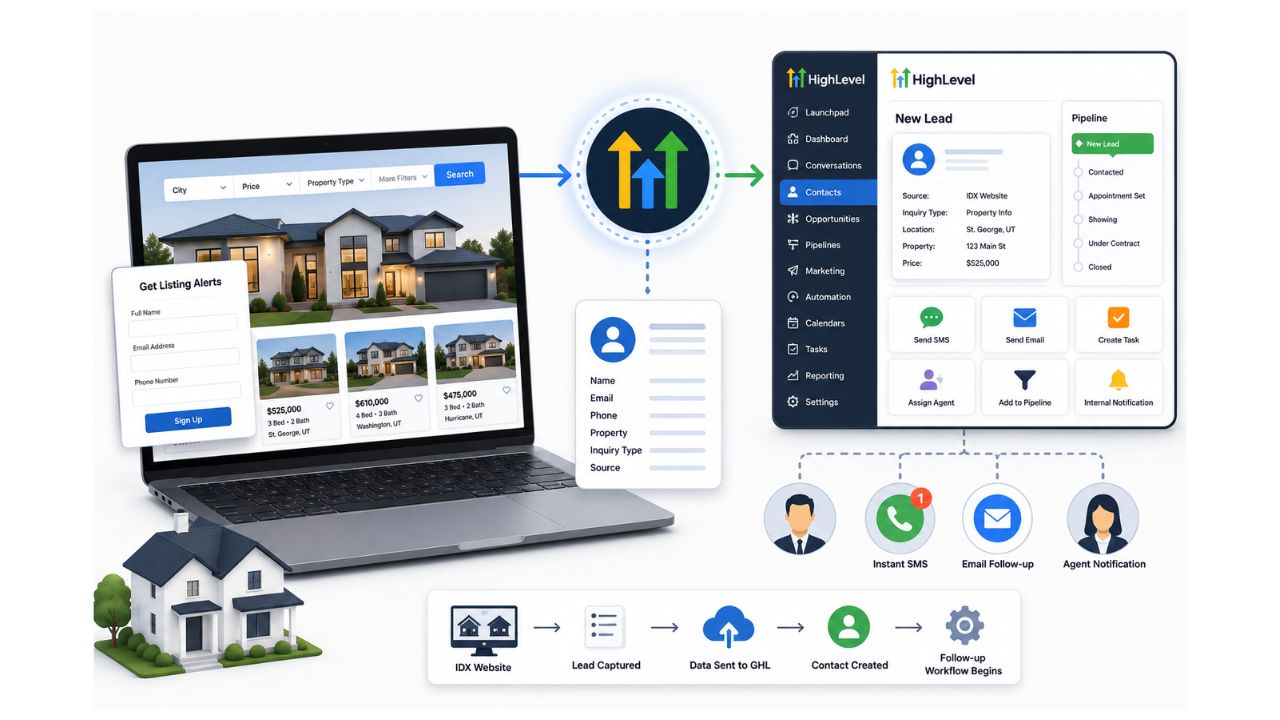
An IDX website helps potential buyers search available properties, review listing details, save searches, and request information. However, displaying properties is only the first part of an effective real estate marketing system.
What happens after a visitor registers or submits a property inquiry can determine whether that visitor becomes a qualified lead or disappears without speaking to an agent.
Connecting your IDX website with GoHighLevel can help bridge that gap.
The IDX platform continues to manage the property search experience, while GoHighLevel manages lead communication, qualification, follow-up, appointments, and pipeline activity.
What Is an IDX Website?
IDX stands for Internet Data Exchange. It allows approved real estate professionals and brokerages to display MLS property listings on their websites.
A typical IDX website may allow visitors to:
- Search homes by city, neighborhood, price, or property type
- View individual property details
- Save favorite properties
- Create saved searches
- Request a showing
- Ask for more information
- Register for listing alerts
Modern real estate data is commonly transported through standardized systems such as the RESO Web API. However, the specific features, data access, and integration options available to an agent depend on the MLS and IDX provider being used.
Why Connect IDX with GoHighLevel?
Your IDX website may generate registrations and inquiries, but it may not provide the complete automation system required to nurture every lead consistently.
GoHighLevel can receive lead data and start actions such as:
- Creating or updating a contact
- Adding the lead to a real estate pipeline
- Assigning the lead to an agent
- Sending an immediate SMS
- Starting an email follow-up sequence
- Creating a task for the assigned agent
- Sending an internal notification
- Booking a consultation or property showing
- Separating buyer and seller leads
HighLevel supports inbound webhooks that can receive information from external applications and use that information to initiate workflows.
How an IDX and GHL Integration Works
A basic IDX and GoHighLevel integration may follow this process:
IDX property search → Lead registration → Data sent to GHL → Contact created → Follow-up workflow begins
For example, a buyer searches for homes in St. George, Utah. The buyer views a property and submits a request for more information.
The integration sends the buyer’s information to GoHighLevel, including:
- First and last name
- Email address
- Phone number
- Property URL
- MLS number
- Property location
- Price
- Inquiry type
- Lead source
- Assigned agent
GoHighLevel can then create the contact, add an opportunity to the buyer pipeline, send a personalized SMS, and notify the appropriate agent.
Interesting Read: How GoHighLevel Helps Convert IDX Website Visitors into Real Estate Leads
Three Ways to Connect IDX with GoHighLevel
1. Native Integration
Some IDX providers may offer a direct CRM integration or a connection through an application marketplace.
This is usually the easiest option because it requires less custom configuration. However, native integrations may offer limited control over field mapping, pipeline stages, agent assignment, and property-specific information.
Before selecting this option, check exactly what information the integration transfers.
2. Zapier, Make, or n8n
An automation platform can act as the bridge between the IDX website and GoHighLevel.
The process may look like this:
IDX platform → Zapier, Make, or n8n → GoHighLevel
This option is useful when you need to:
- Format phone numbers
- Prevent duplicate contacts
- apply tags
- Map custom fields
- Assign leads based on location
- Create different opportunities
- Send data to multiple systems
- Maintain an integration log
This approach provides more flexibility than many basic native integrations.
3. Webhook or API Integration
For a more customized system, the IDX provider can send lead information through a webhook or API.
GoHighLevel’s inbound webhook trigger can receive data from an external platform and use it within a workflow. An API integration can also help connect the IDX platform with GoHighLevel when more control over data transfer and automation is required.
A custom connection is often the best option for brokerages that require complex assignment rules, detailed lead tracking, multiple offices, or custom reporting.
What Information Should Be Sent to GHL?
Do not transfer only the buyer’s name, email, and phone number.
The property context is equally important.
Useful fields may include:
- Property address
- Listing URL
- MLS identification number
- Listing price
- Selected city
- Preferred price range
- Number of bedrooms
- Number of bathrooms
- Buyer or seller status
- Desired purchase timeline
- Financing status
- Preferred agent
- Original lead source
GoHighLevel custom fields can be used to organize information that is specific to a real estate business, including buyer preferences and lead qualification details.
Example Immediate Follow-Up
The first message should feel conversational rather than automated.
Example SMS:
Hi Sarah, this is Gracie from Burton Brokerage. I saw that you were looking at a home in Kanab. Are you interested in that specific property, or would you also like to see similar homes in the area?
This message gives the buyer an easy reason to reply.
Depending on the response, the workflow can assign the conversation to an agent, send similar properties, or provide a booking link.
Create Separate Workflows for Different IDX Actions
Not every IDX lead has the same intent.
A visitor who requests a showing may be more ready to act than someone who creates a general property alert.
Consider creating separate workflows for:
- Property information requests
- Showing requests
- Saved property registrations
- Saved search registrations
- New listing alerts
- Home valuation requests
- Buyer consultations
- Seller consultations
- Open house registrations
Separating these workflows makes the communication more relevant to the lead’s original action.
Common IDX Integration Mistakes
Sending Generic Messages
A message such as “Thank you for your inquiry” does not continue the property conversation.
Mention the property or location whenever the data is available.
Creating Duplicate Contacts
The integration should check for an existing contact before creating a new record.
Losing the Property URL
Without the listing URL or MLS number, the agent may not know which property generated the inquiry.
Following Up Only Once
Many buyers are researching before they are ready to schedule a showing. They may require several helpful follow-ups over multiple days or weeks.
Treating Every Lead the Same
A cash buyer requesting a showing should not receive the same workflow as a visitor who only signed up
for general listing alerts.
Does GHL Replace the IDX Platform?
In most cases, no.
The IDX provider remains responsible for accessing and displaying approved property listing data. GoHighLevel functions as the CRM, communication, marketing automation, appointment, and pipeline system.
The two platforms perform different but complementary roles:
IDX website: Property discovery and listing search
GoHighLevel: Lead management, follow-up, qualification, appointments, and sales pipeline
Build the Right IDX and GoHighLevel Integration
A successful connection requires more than simply moving contact information from one platform to another.
The integration should preserve the property context, identify the visitor’s intent, assign the appropriate agent, and begin a useful conversation quickly.
At Hike Branding, we provide white label GoHighLevel development services for agencies that need support with custom integrations, automation, workflows, APIs, and CRM solutions. Our team can help connect IDX websites with GoHighLevel using webhooks, Zapier, Make, n8n, or custom development based on the project requirements.
We can help you review your current IDX lead process, map the required data, build automated workflows, and create a practical follow-up system for buyer and seller leads.
Need help connecting your IDX website with GoHighLevel? Contact Hike Branding to discuss your integration and real estate automation requirements.